We earn affiliate commissions from some links in this article, some vendors on this list advertise on RouterFreak. Payment can get a tool reviewed, but it doesn’t buy a rank: every tool is scored against the same five criteria in our methodology. This revenue keeps RouterFreak free for readers.
A network monitoring system (NMS) is the tool that tells you a link is saturated, a switch is overheating, or a firewall config changed at 2 a.m., ideally before users notice. Picking one is harder than it should be. Every vendor claims auto-discovery, real-time alerting, and “single pane of glass” dashboards, and the real differences are buried in licensing models, deployment options, and how well the tool holds up once you pass a few hundred devices.
This guide ranks the network monitoring tools we think network engineers should shortlist in 2026. The ranking favors depth (SNMP, flow analysis, configuration management, topology), scale, and multi-vendor coverage over ease of setup or the lowest sticker price. If you run a small network with no dedicated network engineer, the “Best for” notes will point you to the tools that fit that situation better. Each tool links to a full page with features, pricing, pros and cons.
What changed in the October 2026 update
- Re-ranked the list on network engineering criteria. SolarWinds moves to #1 and Auvik moves to #5.
- Added Progress WhatsUp Gold at #6, including its 2026.0 release and its security history.
- Moved tools that are not full network monitoring systems into their own sections: Noction IRP and PingPlotter (specialist tools), Dotcom-Monitor (web monitoring), and NinjaOne and Atera (RMM platforms).
- Moved the full write-up for each tool to its own page, so this page stays a ranking you can scan.
- Refreshed pricing for every tool. Several vendors changed models since our last update: PRTG is subscription-only, SolarWinds now also sells NPM inside SolarWinds Observability Self-Hosted, Checkmk renamed its editions, LogicMonitor and WhatsUp Gold publish list prices, and Domotz moved to per-site pricing.
How they score
Network Monitoring Tools Ranking| Tool | UI/UX | Scalability | Features | Integration | Value | Rating | |
|---|---|---|---|---|---|---|---|
| 1. | SolarWinds NPM | 9 | 10 | 10 | 9 | 7 | 9.0 |
| 2. | ManageEngine OpManager | 8 | 9 | 9 | 9 | 9 | 8.8 |
| 3. | Zabbix | 7 | 10 | 9 | 8 | 9 | 8.6 |
| 4. | LogicMonitor | 8 | 10 | 9 | 9 | 6 | 8.4 |
| 5. | Auvik | 10 | 8 | 8 | 8 | 7 | 8.2 |
| 6. | WhatsUp Gold | 9 | 7 | 8 | 7 | 9 | 8.0 |
| 7. | Checkmk | 6 | 9 | 8 | 7 | 9 | 7.8 |
| 8. | Paessler PRTG | 9 | 6 | 8 | 8 | 7 | 7.6 |
| 9. | Datadog | 8 | 9 | 7 | 9 | 4 | 7.4 |
| 10. | Site24x7 | 8 | 8 | 6 | 7 | 7 | 7.2 |
| 11. | Domotz | 9 | 6 | 5 | 6 | 9 | 7.0 |
Scores are our editorial assessment against the five criteria in how we evaluated these tools, based on hands-on testing where we have it, vendor documentation, current pricing, user reviews, and published security advisories. The rating is the average of the five scores.
The 11 best network monitoring tools
1. SolarWinds NPM: best for deep network visibility (9.0)
Best for: Mid-size and large networks that need deep performance monitoring, configuration management, and flow analysis from one vendor, and can commit to a multi-year contract.

SolarWinds Network Performance Monitor has the deepest network feature set on this list and remains the reference point most other tools are measured against. NetPath traces hop-by-hop paths through networks you don’t control, and PerfStack lines up metrics from different devices on one timeline when you’re chasing an outage.
Pricing: sold standalone by quote, or inside SolarWinds Observability Self-Hosted from $8 (Essentials) or $14 (Advanced, adds NCM and NetFlow) per node per month, multi-year, billed annually. 30-day trial.
- Pro: performance, configuration, and flow analysis from one vendor, with a huge user community.
- Con: multi-year contracts and a Windows/SQL Server back end that needs real hardware at scale.
Scores: UI/UX 9 | Scalability, support & security 10 | Features 10 | Integration 9 | Value 7. SolarWinds NPM: features, pricing, pros and cons
2. ManageEngine OpManager: best value for on-premises depth (8.8)
Best for: Teams that want on-premises depth (config backup, NetFlow, virtualization) at a lower cost than SolarWinds.

ManageEngine OpManager comes closest to SolarWinds on breadth and runs on Windows or Linux. Licensing is per device, so a 48-port switch counts once no matter how many interfaces you poll. Configuration management and NetFlow analysis are add-ons, or bundled in OpManager Plus.
Pricing: published. Annual subscriptions from $95 (Standard), $145 (Professional), and $4,595 (Enterprise, 250 devices); perpetual from $245, $345, and $11,545. Free edition for 3 devices; 30-day trial.
- Pro: published, per-device pricing that covers every interface on a device.
- Con: a big jump to Enterprise for distributed monitoring, and high availability is a paid add-on.
Scores: UI/UX 8 | Scalability, support & security 9 | Features 9 | Integration 9 | Value 9. Read our hands-on OpManager review
3. Zabbix: best open source (8.6)
Best for: Organizations with experienced Linux and network staff who want full control and no license costs.

Zabbix is fully open source with no paid feature tier, and it scales to very large environments with proxies at remote sites. Templates and low-level discovery do a lot of the setup for you, but expect weeks of tuning before alerts are trustworthy.
Pricing: free (AGPLv3). Optional support from €245 ($325) per month. The real cost is staff time.
- Pro: no license fees and no feature paywall, at almost any scale.
- Con: no native NetFlow analysis or configuration backup; you’ll need companion tools for both.
Scores: UI/UX 7 | Scalability, support & security 10 | Features 9 | Integration 8 | Value 9. Zabbix: features, pricing, pros and cons
4. LogicMonitor: best for hybrid and cloud infrastructure (8.4)
Best for: Hybrid and cloud-heavy organizations that prefer a cloud-hosted platform and have the budget for it.

LogicMonitor covers network devices, servers, storage, cloud, and Kubernetes in one console. Collectors on your own servers poll devices and send data to LogicMonitor’s cloud, where its Edwin AI features correlate alerts and cut noise.
Pricing: published, per “hybrid unit” (one device, or five wireless APs): Essentials from $16, Advanced from $27, Signature from $53 per unit per month. 15-day trial.
- Pro: one platform and one billing unit for network, server, and cloud monitoring.
- Con: among the most expensive options here, and monitoring data leaves your network.
Scores: UI/UX 8 | Scalability, support & security 10 | Features 9 | Integration 9 | Value 6. LogicMonitor: features, pricing, pros and cons
5. Auvik: best for MSPs and lean IT teams (8.2)
Best for: MSPs and lean IT teams managing many sites who value automation over deep customization.

Auvik has the best automated topology mapping and configuration backup we have seen, and it gets a lean team productive faster than anything else here. A collector inside each network builds a live map and inventory, backs up device configs, and lets you open any device’s CLI from the dashboard.
Pricing: per billable network device per month (access points, printers, UPS units, and NAS devices are free). Auvik’s published example puts the Core tier at $27 per network device. Unlimited users and sites; 14-day trial.
- Pro: automation that lets a small team manage a lot more network.
- Con: no on-premises option, and per-device cost adds up on dense switch networks.
Scores: UI/UX 10 | Scalability, support & security 8 | Features 8 | Integration 8 | Value 7. Read our hands-on Auvik review
6. Progress WhatsUp Gold: best network maps for on-premises teams (8.0)
Sponsored: Progress paid for a detailed review. Its rank comes from the same scoring as every other tool.
Best for: Windows-centric shops that want on-premises monitoring with strong maps and that patch promptly.
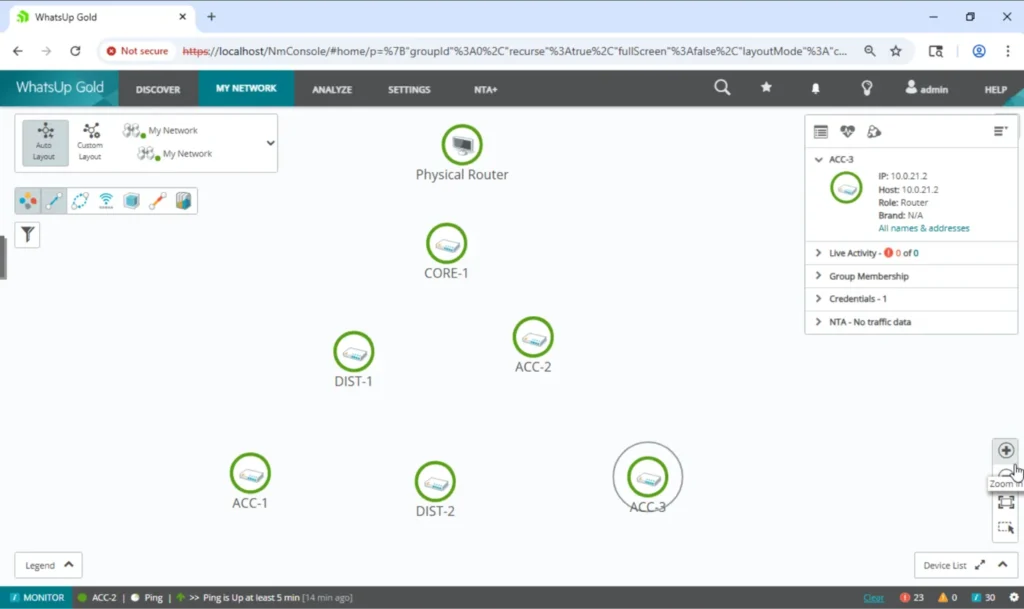
Progress WhatsUp Gold is a mature on-premises monitor for Windows Server, with some of the clearest interactive network maps in the category. The current 2026.0 release adds certificate discovery on any port and a new per-server credential encryption key. Its security record is what keeps it from ranking higher: CISA lists two of its 2024 flaws (CVE-2024-6670 and CVE-2024-4885) as exploited in the wild, the first in ransomware attacks. Stay on the latest release (2026.0.2 or later) and keep the console off the internet.
Pricing: published subscriptions from $1,229 (Business), $2,049 (Enterprise), and $3,469 (Enterprise Plus) per year for 50 devices; perpetual licenses by quote. Free edition for 10 devices; 30-day trial.
- Pro: excellent maps and approachable setup, with editions from 50 devices to large distributed deployments.
- Con: a history of critical, actively exploited vulnerabilities, and Windows Server only.
Scores: UI/UX 9 | Scalability, support & security 7 | Features 8 | Integration 7 | Value 9. Its security history costs it a point on scalability, support and security; published pricing and a perpetual option earn one on value. Read our hands-on WhatsUp Gold review
7. Checkmk: best open-source starting point (7.8)
Best for: Technical teams that want to start free on open source and move to a supported edition later.

Checkmk discovers interfaces and services automatically and has more than 2,000 integrations. It renamed its editions recently: the free edition is now Community, and the commercial ones are Pro, Ultimate, and Ultimate with Multi-Tenancy, plus the SaaS Cloud.
Pricing: Community is free with no host limit (positioned for about 100 hosts). Pro from €190 and Ultimate from €275 per month, billed annually; Cloud from €240 per month.
- Pro: a free start with an upgrade path that doesn’t need a migration.
- Con: a dated interface, and service-based pricing is harder to estimate than per-device.
Scores: UI/UX 6 | Scalability, support & security 9 | Features 8 | Integration 7 | Value 9. Checkmk: features, pricing, pros and cons
8. Paessler PRTG: best for fast setup (7.6)
Best for: Small and mid-size networks that want broad coverage quickly, before sensor counts make licensing expensive.

Paessler PRTG is one of the easiest tools here to get running, with hundreds of sensor types and a failover node included with on-premises licenses. Since July 2024, new licenses are subscription-only.
Pricing: published, by sensor count, paid annually: from $200 per month for 500 sensors (about 50 devices) to $1,642 for 10,000. Free for 100 sensors.
- Pro: broad monitoring running in an afternoon, on-premises or hosted.
- Con: sensor-based licensing gets expensive as you add interfaces and metrics.
Scores: UI/UX 9 | Scalability, support & security 6 | Features 8 | Integration 8 | Value 7. Paessler PRTG: features, pricing, pros and cons
9. Datadog: best for teams already on Datadog (7.4)
Best for: Organizations already running Datadog for cloud and application monitoring.

Datadog adds network device monitoring (SNMP) and cloud network monitoring (flows between services) to a full observability platform, so network data sits next to your application and log data.
Pricing: published. Network Device Monitoring $7 per device per month billed annually; Cloud Network Monitoring $5 per host; NetFlow billed separately.
- Pro: network, application, and cloud data in the same dashboards.
- Con: modular pricing compounds quickly, and network depth trails dedicated tools.
Scores: UI/UX 8 | Scalability, support & security 9 | Features 7 | Integration 9 | Value 4. Datadog network monitoring: features, pricing, pros and cons
10. Site24x7: best all-in-one SaaS on a budget (7.2)
Best for: Small and mid-size businesses that want one inexpensive SaaS tool for web and infrastructure monitoring.

Site24x7, from Zoho, combines website, server, application, log, and network monitoring in one SaaS platform. Network devices are polled by an on-premises poller, with flow and configuration management as add-ons.
Pricing: published, from $9 per month billed annually, with network components, logs, and synthetic checks sold as add-on blocks.
- Pro: low entry price and web, application, and infrastructure monitoring in one place.
- Con: shallower network depth than dedicated tools, including Zoho’s own OpManager.
Scores: UI/UX 8 | Scalability, support & security 8 | Features 6 | Integration 7 | Value 7. Site24x7: features, pricing, pros and cons
11. Domotz: best budget choice for many small sites (7.0)
Best for: Small businesses, integrators, and MSPs monitoring many small sites on a tight budget.

Domotz is a simple remote monitoring platform built around a lightweight collector at each site, which can run on a Domotz Box, a VM, a NAS, Docker, or a Raspberry Pi. Remote access and power cycling save site visits.
Pricing: per site since September 2026: $35 per site per month for MSPs, IT teams, and integrators, discounted to $17.50 at volume for MSPs and integrators; residential from $20 per home.
- Pro: easy to deploy and affordable across many small sites.
- Con: limited flow analysis and configuration management, and pricing changes often.
Scores: UI/UX 9 | Scalability, support & security 6 | Features 5 | Integration 6 | Value 9. Domotz: features, pricing, pros and cons
How we evaluated these tools
We have tested Auvik, OpManager, and WhatsUp Gold hands-on, and their reviews describe how. The other tools are scored from vendor documentation, current pricing, user reviews, and published security advisories, and their pages say so. Every tool is scored on the same five criteria.
1. Usability and interface
How long it takes to go from install to useful alerts, how clear the dashboards and maps are during an outage, and how much the interface can be tailored to your environment without professional services.
2. Scalability, support, and security
Whether the tool handles growth from hundreds to thousands of devices (distributed pollers, high availability, multi-site), the quality of vendor support, and the vendor’s security track record. A monitoring server stores SNMP, SSH, and admin credentials for every device it watches, so its own vulnerabilities matter more than most software in your stack.
3. Feature set and network depth
SNMP polling and traps, flow analysis (NetFlow, sFlow, IPFIX), configuration backup and change tracking, topology mapping, baselining, and alerting flexibility. Tools that do these natively score higher than tools that need add-ons.
4. Integration and compatibility
Multi-vendor device support, APIs, and integrations with ticketing, chat, and incident tools such as ServiceNow, Slack, Microsoft Teams, and PagerDuty.
5. Value for cost
What you get relative to the total cost: license or subscription, required add-ons, support renewals, and the staff time needed to run it. Free tools are not automatically the best value, and contract terms (multi-year commitments, renewal increases) count against a tool.
A note on rankings: No ranking fits every network. A tool near the bottom of this list may be the right fit for your environment, and that is fine. Use the scores and “Best for” notes to build a shortlist, then trial two or three tools against your own devices.
Specialist and complementary tools
These tools solve specific network problems well, but they do not replace a full network monitoring system. Many teams run one of them alongside a tool from the main list.
Noction IRP: best for multi-homed BGP route optimization

Noction’s Intelligent Routing Platform (IRP) is built for networks with multiple ISP connections running BGP. Standard BGP picks routes on static attributes such as AS-path length. IRP measures latency, packet loss, throughput, and historical reliability across your providers and steers traffic to the best-performing path, with failover when a path degrades.
- What it does well: performance-based BGP route optimization, outbound traffic balancing across ISPs to stay under 95th-percentile commits, BGP monitoring and alerting, and detailed reporting on routing improvements.
- Limitations: only useful if you are multi-homed with BGP, and it takes routing expertise to deploy.
- Pricing: by custom quote, based on your monthly 95th-percentile bandwidth, with a one-year minimum term.
Bottom line: for ISPs, hosting providers, and enterprises whose internet connectivity is mission critical, Noction is one of the few tools that improves routing instead of just reporting on it. For single-ISP networks, it does not apply. Read our Noction review
PingPlotter: best for path and latency troubleshooting

PingPlotter combines ping and traceroute into continuous, graphed path monitoring that shows latency and packet loss at every hop. It is the right tool when a user says “the internet is slow” and you need proof of where the problem is, including inside an ISP’s network.
- What it does well: visual hop-by-hop traces, timeline graphs, jitter and MOS for VoIP (Professional and Cloud), shareable reports, and remote agents for distributed teams (Cloud).
- Limitations: it runs on computers, not on routers or switches, so it does not monitor device health the way an NMS does. The desktop editions run on Windows and macOS; Cloud agents also run on Linux.
- Pricing: a free edition covers one target. Standard is $6.99 per month and Professional is $29 per month, with perpetual licenses at $39.99 and $349. PingPlotter Cloud is priced per agent, from $90 per month for 5 agents.
Bottom line: inexpensive, fast to deploy, and one of the best troubleshooting tools a network engineer can own. Run it next to your NMS, not instead of one. Read our PingPlotter review and PingPlotter Cloud review.
Web application monitoring
Dotcom-Monitor: best for website and web application monitoring

Dotcom-Monitor checks the availability and performance of websites, APIs, and web applications from locations around the world. It can script multi-step transactions such as logins and checkouts, run real-browser tests, load-test web applications, and monitor services such as DNS, FTP, and SMTP.
- What it does well: synthetic monitoring of user-facing services from a global network of locations, with alerting and reporting.
- Limitations: it does not monitor network infrastructure (routers, switches, firewalls) in any depth.
- Pricing: a free plan covers up to 25 targets with 5-minute checks. Paid subscriptions start at $19.99 per month for 10 targets at 5-minute checks and scale up to 100 targets and 1-minute checks at higher prices.
Bottom line: a good fit for e-commerce and web service providers that need to know their sites and APIs work for users everywhere. Pair it with a network monitoring tool for infrastructure.
RMM platforms with network monitoring
Remote monitoring and management (RMM) platforms are built to manage endpoints: patching, remote access, scripting, and ticketing. Both of the platforms below include network device discovery and SNMP monitoring, which can be enough for MSPs and IT departments whose main job is managing PCs and servers. Neither matches a dedicated network monitoring tool for depth.
NinjaOne: best entry-level RMM for IT teams

NinjaOne is a cloud-based endpoint management platform with patch management, remote control, scripting and automation, and a unified dashboard across devices. Its network management features add SNMP monitoring and network device visibility alongside endpoints.
- What it does well: fast, well-regarded patching and endpoint automation with a clean interface.
- Limitations: network monitoring is secondary to endpoint management.
- Pricing: per device per month, from $3.75 per device for 50 or fewer endpoints down to $1.50 per device at 10,000 endpoints. Exact rates are by quote.
Atera: best for per-technician pricing

Atera combines RMM, ticketing, patch management, and automation in one cloud platform for IT departments and MSPs. Its pricing is per technician with unlimited devices, which is unusual in this market. Every plan now includes Atera’s AI Copilot assistant; its autonomous AI agent, Robin, is sold separately.
- What it does well: predictable costs for teams that manage many endpoints per technician, with helpdesk and ticketing built in.
- Limitations: network monitoring is basic compared with dedicated tools, and some users report gaps in customization.
- Pricing: IT department plans are $149 (Professional), $189 (Expert), and $219 (Master) per technician per month billed annually, with Enterprise by quote. MSP plans are priced separately. These prices took effect in mid-2026.
What to consider when choosing a network monitoring tool

Most tools on this list share the basics: discovery, SNMP polling, alerting, and dashboards. Focus your evaluation on where they differ.
1. Open source or commercial
Open-source tools such as Zabbix and Checkmk Community cost nothing to license and give you full control, but you carry the setup and maintenance. Commercial tools come with support, faster setup, and features like configuration management that open-source tools often lack. Plan for the engineering time you will need to run it.
2. Cloud-hosted or on-premises
Cloud-hosted tools (Auvik, LogicMonitor, Datadog, Domotz) remove server maintenance and scale easily, though most still need a small collector inside your network. On-premises tools (SolarWinds, OpManager, WhatsUp Gold, PRTG) keep monitoring data inside your network, which matters for regulated or air-gapped environments. Several vendors offer both.
3. Licensing model
Pricing models vary more than features do, and the wrong one can double your bill:
- Per device or node: SolarWinds, OpManager, Auvik, WhatsUp Gold, Datadog. Predictable; check what counts as a device.
- Per sensor or service: PRTG, Checkmk. Grows with every interface and metric you add.
- Per normalized unit: LogicMonitor’s hybrid units weight different resource types.
- Per site: Domotz. Good for many small sites.
- Per technician: Atera. Good when each technician manages many devices.
4. Contract terms
The industry has moved to subscriptions. SolarWinds’ bundled editions require multi-year subscriptions, PRTG ended perpetual licensing in 2024, and perpetual licenses that remain (WhatsUp Gold, OpManager) need paid support renewals for updates. Ask about renewal caps, what happens to your data if you cancel, and whether you can reduce counts mid-term.
5. Security of the monitoring platform
Your monitoring server holds credentials for every device on your network, which makes it a high-value target. Check the vendor’s vulnerability history and patch cadence, keep the platform on a management network that is not reachable from the internet, use read-only SNMPv3 credentials wherever you can, and patch it as quickly as you would a firewall.
6. Protocols and monitoring focus
Standard protocols (SNMP, flow, syslog, APIs) give the broadest device coverage; agent-based tools go deeper on servers and endpoints but cannot run on network gear. Decide what you are really trying to watch, whether that is infrastructure, user-facing websites, endpoints, or internet routing, and pick a tool built for that job.
Conclusion
For deep network visibility, SolarWinds and OpManager lead, with Zabbix as the open-source alternative for teams that have the skills to run it. LogicMonitor and Auvik are the strongest cloud-hosted choices, and WhatsUp Gold is a capable on-premises option for teams that keep it patched. Smaller networks should look hard at PRTG, Checkmk, Site24x7, and Domotz.
Whatever you shortlist, run a trial against your own devices. Discovery quality, alert noise, and how a tool handles your specific hardware will tell you more than any ranking.